Showing posts with label ipad. Show all posts

Tuesday, October 23, 2012

2x speed iPad, iPad mini, slim iMac, and Fusion Drive

"Too much emotions is always a good thing"

http://www.apple.com/

Still waiting for my iphone 5 though...

Sunday, January 22, 2012

DigiTech iStomp - future of the stompbox


The iStomp™ works just like every other stompbox. Step on the footswitch to turn it on and off. Adjust the knobs to get the sound you want. The biggest difference between the iStomp and other stompboxes is you can completely change the iStomp to be any pedal in the entire pedal line. Simply connect your iPod touch®, iPhone®, or iPad® to the iStomp and select which pedal you’d like from the DigiTech® Stomp Shop™ App. In about the same time it takes to download a song you can change the iStomp from a distortion to a reverb, a phaser to a tube overdrive, or a delay to a chorus. iStomp includes DigiTech’s Total Recall™ digital delay and Redline™ overdrive to get you started

Mackie DL1608, iPad and Psychodelic Trip into the Mix


With the Mackie DL1608’s seamless wired to wireless mixing capabilities, you can mix in real time from anywhere in the venue on your iPad®.* Instantly adjust mix functions from tuning front of house trouble spots to ringing out stage monitors.
*An additional Wi-Fi router is required and must be connected to the DL1608. The iPad must be within range of the Wi-Fi router to enable wireless mixing functionality. Wi-Fi router not included. 

The Mackie DL1608 comes loaded with 16 studio-quality Onyx mic preamps that deliver depth, headroom and immense detail to your live mix. Plus, with 12 XLR and four combo mic/line inputs, connecting mics and instruments is quick and easy.

The Mackie DL1608’s high-end 24bit Cirrus Logic® AD/DA converters offer a remarkable 114 db dynamic range. We align our Onyx pre-amps precisely with the converters to provide you with the most headroom and the lowest noise and distortion possible—resulting in brilliant sound quality from a vocal whisper to a wailing guitar solo.

The DL1608 is loaded with a choice of powerful plug-ins on every channel, so you won’t need to set up additional racks of outboard gear. With just the touch of a finger, you have total control over 4-band EQ, compression and gate plug-ins. Plus, sweeten your sound with a full-featured reverb and tap delay or adjust your mix to the room with the 31-band graphic EQ and compressor/limiter on the main and aux outs.

Supporting up to 10 iPads simultaneously, the Mackie DL1608 allows multiple engineers to control the mix. Plus, it gives band members the ability to adjust their own monitors. Now, the band can dial in the mix they want to hear in real time right on stage.

The Mackie DL1608 allows you to recall mix functions with just the touch of a finger. With Total Snapshot Recall*, you can now easily save and access sound check settings for multiple bands, complex song mixes, previous mixes from challenging venues, recall scenes for theater productions and more. You can even pre-set the mixing board and be ready to go the moment you arrive. *Mic pre-amp gains are not recallable.

Quickly set up a new mix with the DL1608’s Channel Presets. With simple touch screen control, you can immediately assign a factory or your own custom channel preset for kick drum, bass, guitar, keyboard and more to any channel you choose. And when you’ve made the perfect settings, easily save them for later use and share them with your friends.

The Mackie DL1608 lets you to record your mix from the L/R stereo outputs directly to your iPad, allowing you to upload it to your favorite application and share it with others.

Whether you want to play pre-show music or add a Garage Band track to your live mix, with the Mackie DL1608 you can bring in stereo audio from any iPad application. Best of all, with the pre-assigned iPad channel, you can do it without using up one of the mixers 16 channels.*
*iPad must be docked.

The DL1608 lets you take a picture of band members with your iPad or choose your own picture to help you easily identify your assigned channels. There's a choice of included icons to get you up and running.

The Mackie DL1608 is perfect for installing in venues. With its easy to use Master Fader iPad application it has never been easier to train up new sound engineers. Plus, forget the bulky racks of outboard gear, the powerfully small, low profile design lets you install it just about anywhere.

The DL1608 is big on security. The PadLock™ feature locks down your iPad for permanent installs, while the Kensington lock—the industry standard in protecting technological equipment—secures the mixer to guard it from theft.

Monday, January 9, 2012

Voice Synth for iPad, iPhone: Demo & Tutorial

Spark Digital: USB Microphone for iPad


Spark Digital is the world's first studio-grade condenser microphone to offer both USB and iPad connectivity. Expanding on the professional and sound of Blue's Spark XLR studio microphone, Spark Digital features the same studio-grade condenser capsule and hand-tuned components for high-fidelity recording and consistence performance in any situation– vocals, drums, piano, speech, location recording and more.
Spark Digital also includes the Focus Control, providing two different sonic options in one mic at the push of a button. Complete with an adjustable desk stand and built-in shockmount, Spark Digital also includes y-cables for each platform with a headphone jack for zero-latency real-time monitoring. With a full range of recording capabilities, Spark Digital turns your iPad into a true mobile studio.
via
http://www.idesignsound.com/blue-microphones-announce-spark-digital-usb-microphone-for-ipad/
http://www.bluemic.com/spark_digital/

Wednesday, August 3, 2011

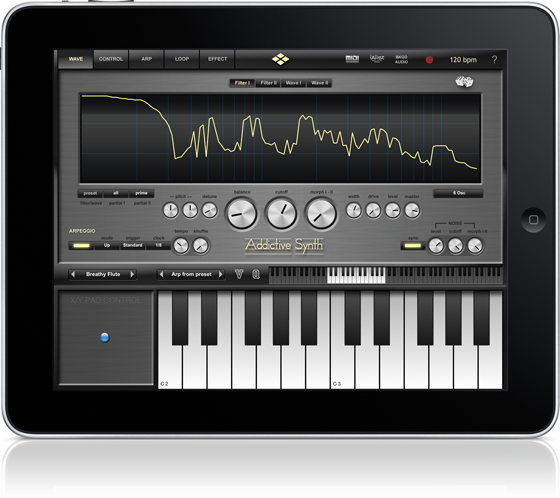
Addictive Synth

Now Manual online


It was never so easy to create beautiful sounds and driving loops.
The unique dynamic wavetable synthesis allows you to explore an unprecedented
wide range of sonic territory. From acid loops, crystal clear percussions, realistic
human choirs to complex musical soundscapes nothing seems impossible
with only a handful parameters to tweak.

Together with the intelligent randomizer for both sounds and arpeggios you
will loose any sense of time and space while exploring unknown sonic territories.

Right from the beginning you'll understand why it's named Addictive.

With the Apple iPad Camera Connection Kit you can use  a CoreMIDI compatible MIDI Keyboard to control iSyn Poly.


Dynamic wavetable synthesizer
  • Six dynamic wavetable oscillators per voice, up to 48 total.
  • Continous morphing between two oscillator sets.
  • Realtime editing of up to 128 partials (overtones).
  • Realtime editing of filter structure to create arbitrary body resonances.
  • Extensive modulation possibilities using up to 4 LFOs and 4 Envelopes.
  • Control matrix allows real time control of five parameters using the X/Y touch pad, the modulation wheel and the tilt sensors of the iPad.
  • Monophonic or polyphonic with 8 voices.
  • 128 factory presets, unlimited user presets can be shared.
  • Up to three effects concurrently usable selected from: equalizer, phaser, flanger, chorus and stereo/cross delay.
Live
  • Play melodies live with the onscreen keyboard. Drag fingers for slides and vibrato.
  • Optionally use CoreMIDI* compatible hardware keyboard.
Full featured programmable Arpeggiator
  • Uses programmable sequences with up to 32 steps.
  • Can trigger single notes and chords.
  • Unique randomizer generates Arpeggios with 100% usability.
  • 32 Arpeggios included, unlimited useer arpeggios possible.
  • For each step you can program tie, accent, transposition and note order
Global
  • Export loops as audio and midi files.
  • Audio pasteboard. Copy audio recordings to Clipboard for use with other Apps (e.g. Intua BeatMaker and many others)
  • Exchange user presets with File Sharing in iTunes.


http://www.virsyn.net/mobileapp/images/addictive/AddictiveSynth.pdf
Addictive Synth

Saturday, July 30, 2011

Friday, July 29, 2011

‪Introducing Tabletop for iPad‬‏


Retronyms has introduced Tabletop – a new virtual studio that turns an iPad into an expandable modular music environment, where you can mix and match different devices.
Features:
  • 15 unique Devices at launch
  • 300 sounds (multisample instruments, loops, phrases)
  • Record sequences, arrange into songs
  • Adjustable quantization (pre- and post-record)
  • Recordable parameter automation
  • Overdub and replace record modes
  • Trigger sequences and patterns live
  • Multitouch instruments and devices
  • Sampling (internal mic, line in)
  • Adjustable tempo
  • Import your own sound library, save presets
  • Support for imported .mid phrases
  • Insert and send/return (master) effects
  • Undo history
  • 44Khz, studio-quality audio
  • Sync 2 iPads running Tabletop or other apps with WIST
  • Import sounds from dozens of apps with AudioPaste
Tabletop comes with a basic set of modular devices, which will be expandable via in-app purchases.
Included devices:
  • Gridlok: Pad Sampler
  • M8RX: Tone Matrix
  • RS3: Polyphonic Stereo Keyboard
  • Mr. O: Master Output
  • Goblin MX8: 8-Channel Mixer
  • Spinback: Turntable Player
  • Recorder M2: All-Purpose Input Recorder
  • Filtr LP: Low-Pass Filter Effect
  • T101 – Triggerator: Sequence and Perform
Tabletop is available now for $4.99.


http://retronyms.com/

Tuesday, June 21, 2011

FL Studio Mobile App Released now!


http://www.image-line.com/documents/flstudiomobile.html

Tenorion for iPad iPhone 4 - meet TNR-i


The iOS version of the world-renowned TENORI-ON brings you a completely new musical interface. 
Even if you don't know much about music, you can create music intuitively as if you were arranging sounds in space. The music that you see on the 16 × 16 grid of buttons is the music that is performed.
On the 16 × 16 grid of buttons, basically, the horizontal direction is time, and the vertical direction is pitch. By laying sounds on these buttons, you can combine rhythms and melodies to produce music. A button will glow when its sound is produced. The movements of the glowing lights produce a visual performance.


TNR-i can produce 16 types of sounds at the same time (16 layers), and it can memorize up to 16 song patterns produced using those sounds (16 blocks). By switching between song patterns in real time, you can produce a rich variety of musical expressions.

6 Performance Modes

There are six different types of performance modes that you can select for each layer. You can make elaborate music by combining different modes. In score mode, the most fundamental of the modes, you can arrange sounds horizontally (temporally) and vertically (by pitch). In the exciting random mode, the sounds that you arrange are not just played in order—the melody and rhythm constantly change as twists are added. In draw mode, you can perform music by tracing your finger across the buttons as if drawing a picture. In bounce mode, the glowing lights are like bouncing balls that produce sound when they fall. In push mode, you can continuously change the sound as you perform. In solo mode, which is fun for solo performances, you can easily adjust the speed of repetition and the pitch.

First, please try the demo. You can experience the joy of performance just by switching layers. 
- Loading the Demo: From the menu (touch the display), touch All Blocks, iD-Xtra_uncTK, and then Load. 
- Switching layers: Press R5 and the area that the 16 × 16 buttons are in at the same time. (You can double-tap R5 to hold it and make it easier to switch layers.)

TNR-i Sessions with Distant Friends

The appeal of TNR-i isn't just limited to its faithful duplication of the TENORI-ON concept, design and interface, which were developed under the supervision of Toshio Iwai.
If you are connected to a network, you can participate in TNR-i sessions with distant friends and others. Up to four people can connect to each other over a network and enjoy performing together simultaneously. First, tap Clear and the display at the same time to activate the Game Center feature. Then, invite your friends, or use the auto-match feature to automatically select a partner, and start your session. For more details, see page 23 of the internal manual.
Manual: From the menu (touch the display), touch System Menu and then Manual.

If you update the TENORI-ON (TNR-w or TNR-o) to version 2.1 and use it with TNR-i, you can participate in sessions using the TENORI-ON (TNR-w or TNR-o).

Preset Sounds

The preset sounds of TNR-i are the same as those of the TENORI-ON, and the performance files are also compatible. You can use iTunes to transfer performance files saved on your TENORI-ON SD card to TNR-i. Of course, the reverse is also possible.

Horizon Synth for iPad

Horizon synth is a virtual analog synthesizer that takes the definition of iOs synthesizer to the next level.

Thanks to carefully designed architecture and heavy usage of coprocessor it blurs the boundaries between iOs and hardware synthesizers.
Horizon was built to perform and works perfectly with any MIDI keyboard or sequencer. A lot of research has been done in order to achieve unheard warmth and clarity.

HIGHLIGHTS

  • True SuperSaw sound emulation, first found in the legendary Roland JP-8000 synthesizer. SuperSaw is a layered waveform consisting of multiple saw waves which are detuned to create an extremely full and epic sound. It's possible to use 2 supersaw oscillators per voice * 7 polyphony = 98 saw oscillators playing the same time!
  • Two independent filters per voice with configurable routing. You can select between various filter types including classic resonant LP,HP,BP,Notch and less common like Comb and Formant.
  • The Morph Group function lets you continuously morph of up to 30 parameters in a sound (including effects), using only the modulation wheel.
OSCILLATORS
  • 2 warm-sounding analog modelled oscillators per voice + 2 sub-oscillators (except SuperSaw). Available waveforms: Saw, PWM pulse,Triangle, SuperSaw.
  • Oscillator 2 hard-sync and configurable routing
  • Osc-mix, ring modulator
  • White noise oscillator
FLEXIBLE MULTI FILTERS
  • Two independent filters per voice with configurable routing. You can select between various filter types including: resonant LP,HP,BP,Notch, Comb and Formant.
  • Configurable routing: serial or parallel with bypass option.
  • ADSR envelope, keyboard tracking and full LFO control
MODULATION
  • Two LFOs per voice. It's possible to assign each LFO to almost any parameter. 3 LFO running modes: trigger, 1 shot, global. 6 waveforms, phase and fade-in knobs
  • The Morph Group function lets you continuously morph of up to 30 parameters in a sound (including effects), using only the modulation wheel.
  • Two Modulation ADSR Envelopes for amplitude and filters cutoff
  • Pitch and modulation wheels
EFFECTS
  • A number of effects are built in: distortion, chorus, equalizer, stereo delay. All parameters can be modulated using mod-wheel.
ARPEGGIATOR
  • Horizon incorporates very powerful programmable arpeggiator. You should think of it more like a small step sequencer.
OTHER FEATURES
  • Over 200 presets
  • 7 voices polyphony
  • Playback modes: poly, solo, arp
  • Built-in recorder supporting AudioCopy and iTunes file sharing.
  • Supports CoreMidi and MidiMobilizer. MIDI key velocity can affect up to 3 parameters.
  • Configurable piano keyboard size
  • Hold button allows you to to keep notes sustaining until you play new notes.
  • With Chord Memory function you can play the chord by only pressing single keys.
  • Tube soft saturation on output

iSyn Poly for iPad

iSyn Poly is an electronic music studio for use with Apple iPad. iSyn Poly places an unbelievable number of features including three studio-quality, fully programmable virtual analog synthesizers and a drum machine packed in just three different screens on your iPad !

Each synthesizer is a full-featured analog modeling synth with three oscillators, a classic 24 db/oct ladder-style lowpass filter, independent filter and amp envelope generators, and full modulation routings. With our 10+ years of experience with analog simulations you can expect some serious sound easily covering all those fat frequencies so prevalent in modern production.

iSyn Poly also includes a sample playback-based drum machine with seventeen kits, each containing eight samples. Drum samples include 808, 909, modular synth drums and numerous 80's drum machines. Volume, pan and decay time are individually adjustable and pitches are tunable over a wide range for crazy effects.

The full fledged sequencer let you arrange complete songs and can record the notes and controller movements  of your performance. The unique gesture oriented user interface makes it ideal for live editing of notes and automations.

Play the three synths or drum machine with the onscreen keyboard/drum pads for fun live jam sessions, or let iSyn Poly do the playing for you with its full featured piano roll sequencer editable while playing. Play the keyboard by touching notes, or sliding up and down for amazingly expressive pitch glides and vibrato. iSyn Poly can even play a beat and synth track while you jam over sequenced tracks for a one-man iPad band!

With the Apple iPad Camera Connection Kit you can use a CoreMIDI compatible MIDI Keyboard to control iSyn Poly.
Features:

Three Independent Synthesizers
  • Three oscillators with sawtooth, pulse, triangle and sine waves. Modulations routings: LFO->pitch, filter ADSR->cutoff, LFO->pulse width.
  • White/Pink noise generator.
  • Classic 24 dB/oct  ladder-style lowpass filter with drive parameter. Modulations routings:  LFO->Cutoff, Filter ADSR->Cutoff, Velocity sensitivity with external keyboard.
  • Amp section includes distortion with drive, asymmetry and crusher (bit reducer) parameters.
  • Control matrix allows real time control of five parameters using the X/Y touch pad, the modulation wheel of an external keyboard and the tilt sensors of the iPad.
  • Arpeggiator for automated sequences.
  • 64 factory presets, unlimited user presets can be shared.
Drum Machine
  • Eight simultaneous instruments arranged into eight user-selectable drum kits.
  • Editor page allows tuning, panning, level and decay time for individual instruments.
Effects Section
  • iSyn Poly features one global effects unit with phaser, flanger, chorus and stereo/cross delay.
  • Effects amount is individually settable for each of the synths and drum machine.
Live
  • Play melodies live with onscreen keyboard/drum pads. Drag fingers for slides and vibrato.
  • Optionally use CoreMIDI* compatible hardware keyboard.
Full featured Sequencer
  • Four track sequencer with piano roll and automation editor.
  • Record what you play live with the onscreen keyboard/drum pads or using an external CoreMIDI compatible keyboard.
  • Real time quantize function and metronome for recording.
  • Arrange your songs with variable length patterns ( 1 - 99 bars ). Move and copy/paste patterns.
  • Recording and playback of X/Y Pad movements, modulation wheel, pitch bend and key velocity.
  • Full set of editing functions with unlimited undo.
  • Modeless gesture optimized editing.
Global
  • Manage unlimited number of songs.
  • Render song or patterns to audio and midi files.
  • Audio pasteboard. Copy audio recordings to Clipboard for use with other Apps (e.g. Intua BeatMaker and many others)
  • Exchange songs and user presets with File Sharing in iTunes.

Wednesday, June 15, 2011

Instrumental for iPad

Description

Launch Special!! 50% off until June 21!!

Instrumental is a Wi-Fi MIDI Virtual Control Surface

Use your iPad with your favorite MIDI software as a 4x4 Drum Pad, Wicki-Hayden Hex-Keyboard, or full-feedback mixing desk.

Like a USB piano keyboard, except all the controls have full feedback, text readouts and dynamic labels, and you're not limited to just a piano layout. The Wicki-Hayden hexagonal layout is a great way to inspire your compositions.

Important Note: Instrumental does not make any sound on its own. It connects via Wi-Fi to MIDI software running on your computer.

See the website for demonstration videos and more information, including the complete user manual.

Instrumental includes 6 highly configurable surfaces, all with plenty of configurable, labelled controls:
- a piano
- a wicki-hayden hexagonal keyboard
- a 4x4 drumpad
- a 16 channel mixer
- 2 completely generic pages for controlling random devices like equalizers, compressors and other effects.

Compatible with any MIDI software, it works best when the controls are automatically labelled by the host software by sending MIDI SYSEX messages.

Drivers for Propellerhead's Reason and Record provide control maps for every Reason and Record device, with automatic control labels that update even when you override controls on the fly!
Features include:
- modular control panels that can be swapped around quickly and easily
- all controls can have labels and text readouts provided by the host, or edited on the fly
- all controls have feedback from the host, so you know exactly where everything is set
- supports the QB Conductor Protocol for reliable low-latency MIDI over Wi-Fi. Conductor servers are available for both Mac and Windows.
- supports the Apple Network MIDI Protocol, available on every Mac.
- connect multiple iPads to the same computer; have your whole band playing through one computer.
- musical layouts with customisable response curves
- much much more!